
In modern eCommerce websites, bounce rates and abandoned sessions are among the most critical performance metrics that determine the overall success of an online store. A high bounce rate signals that users are leaving your site without engaging, while abandoned sessions indicate users are beginning but not completing conversion paths. For Shopify merchants aiming to maximize conversions and revenue, strategies to reduce bounce rates and abandoned sessions are essential.
As a leading Shopify development company, Citytech Software has helped numerous merchants diagnose and resolve performance and UX bottlenecks that contribute to bounce rate and abandonment. In this technical guide, we’ll break down why these issues happen, how they are measured, and what engineering and UX strategies you can implement, by choosing to hire Shopify developers, to reduce bounce rates and abandoned sessions.
Understanding Bounce Rates and Abandoned Sessions in Shopify
Bounce Rate Defined
Bounce rate refers to the percentage of visitors who land on a page and then exit without interacting with any other page or engaging with tracked events (such as click, scroll, form fill, add-to-cart, etc.). A high bounce rate often suggests either a poor landing experience, slow loading, or irrelevant content.
Abandoned Sessions Defined
Abandoned sessions occur when users start a conversion journey, such as browsing products, adding items to a cart, or initiating checkout, but leave before completing the desired action.
Both metrics can hurt conversion rates, diminish ROI on marketing spend, and negatively impact SEO signals and site ranking.
Key Technical Causes of High Bounce and Abandonment Rates
1. Slow Page Load Performance
One of the most documented causes of high bounce rates is poor site performance. Studies consistently show that every second of delay in page load increases bounce probability significantly (e.g., a 1s delay causes 7% loss in conversions).
On Shopify stores, poor performance can come from:
- Unoptimized images (large file sizes, incorrect resolutions)
- Excessive JavaScript and poorly optimized Liquid templates
- Third-party apps that inject unused scripts or block rendering
- Lack of server or CDN cache control
- Unminified CSS/JS
A 2025 Shopify performance guide recommends optimizing the critical rendering path and lazy loading non-critical assets to improve speed and engagement. Reducing total blocking time (TBT) and Largest Contentful Paint (LCP) are key performance indicators.
2. Poor UX / Confusing Navigation
Users form instantaneous judgments about a site’s trustworthiness and usability. If navigation is unintuitive (e.g., hidden menus, unclear category structure, cluttered product pages), users leave.
Technical UX issues include:
- Dynamic content that layout-shifts excessively (Content Layout Shift)
- Inconsistent navigation across devices
- Checkout steps not optimized for user flow
- Unclear value propositions above the fold
Proper UX design is measurable. Technical metrics like First Input Delay (FID) and interaction readiness must be monitored and optimized.
3. Inadequate Frontend Architecture
Some Shopify themes rely heavily on synchronous loaders, third-party libraries, or render-blocking CSS, which delay first meaningful paint. Developers should architect a theme that balances dynamic capabilities (e.g., quick view, filters) with minimal overhead.
Technical best practices include:
- Server-side rendered Liquid templates optimized for critical CSS
- Splitting JavaScript bundles
- Prefetching key assets only when needed
- Usage of Shopify’s Online Store 2.0 and JSON templates which streamline asset loading
Citytech’s Shopify development services often incorporate these methods when building or refactoring storefronts.
4. Lack of Personalization and Relevance
Generic storefronts lack contextual relevance. If users don’t see personalized recommendations, relevant search results, or dynamic category defaults based on their behavior or locality, they exit.
Personalization requires data pipelines and API orchestration that can:
- Precompute recommendations via machine learning
- Record clickstream data and serve dynamic UIs
- Integrate product analytics within the storefront
This is where advanced Shopify development services and data engineers play a role.

How to Reduce Bounce Rates and Abandoned Sessions?
Below, we dive into some actionable, engineering-oriented approaches that Citytech Software can implement for Shopify merchants.
1. Performance Optimization at Scale
A. Asset and Rendering Optimization
- Image Compression and Format Modernization: Serve WebP or AVIF images with responsive srcset attributes.
- Critical CSS Injection: Generate inline critical CSS for above-the-fold content to reduce First Contentful Paint (FCP).
- JavaScript Defer/Async: Defer non-critical scripts and prioritize essential interactions.
- SVG icons and minimal fonts: Reduce font load times with system fonts or lightweight custom subsets.
B. CDN, Caching, and Edge Delivery
- Leverage Shopify’s built-in CDN for static assets, but also implement smart cache invalidation for dynamic sections.
- Use APIs that are idempotent where possible to reduce render-blocking calls.
Success in these areas can be measured by tracking core web vitals (LCP, FID, CLS) using Lighthouse or PageSpeed Insights.
2. Intelligent UX Engineering
A. Navigation & Interaction Metrics
Use analytics heatmaps and session replays to detect navigation bottlenecks. Then implement:
- Sticky header navigation
- Faceted search with instant filter results
- Predictive search suggestions via JavaScript state engines (Algolia, ElasticSearch)
B. Progressive Loading Patterns
- Lazy-load below-the-fold images
- Prefetch critical next page items
- Skeleton screens during asynchronous fetches
These reduce perceived latency, a major psychological factor in bounce behavior.
3. Conversion-Centric Checkout Engineering
Abandoned sessions often occur at checkout due to friction:
- Too many fields
- Lack of autofill/validation
- Popups interfering with mobile viewports
Engineering solutions include:
- One-page checkout designs
- Automatic address completion
- Intelligent field validation
- Payment gateway integrations optimized for mobile (Shop Pay, Apple Pay)
Citytech’s hire Shopify developer engagements often include checkout UX optimization sprints.
4. Personalization and Relevance
Use behavioral signals and product affinity models to personalize content:
- Dynamic Recommendations: “People also bought” or “Trending in your area”
- Custom banners and promotions based on UTM parameters
- Profile-based UI adjustments using customer tags and attributes
Technically, this requires:
- Persistent client-side storage for UI personalization
- API middleware for session segmentation
- Real-time query rewriting in search endpoints
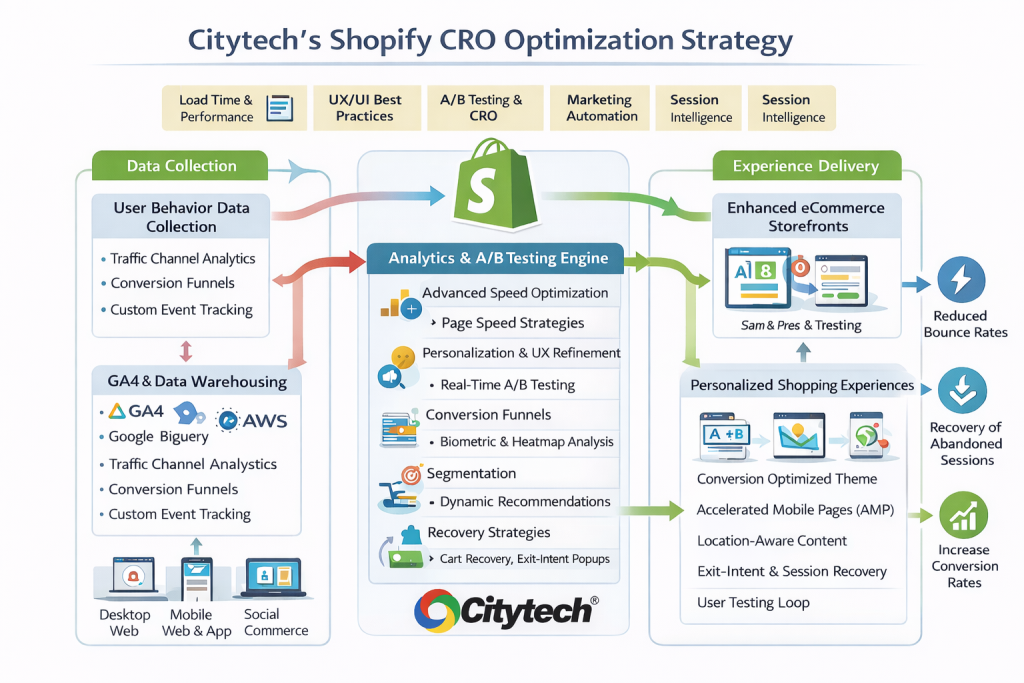
5. Advanced Analytics and Real-Time Monitoring
Reduce bounce rates by catching issues early via:
- Event instrumentation (page views, scroll, CTA clicks)
- Threshold alerts for bounce rate spikes
- A/B testing frontend variants
- Funnel exit analysis
Using data observability tools (Datadog, Segment, Snowplow) combined with Shopify Analytics, Citytech can correlate bounce/exit rates with specific UI or API latencies.
Measuring and Troubleshooting
Understanding the true cause of bounce and abandonment requires technical measurement at multiple layers:
Frontend Metrics
- Core Web Vitals: FCP, LCP, CLS, TBT
- Interaction Rates: Clickthroughs on primary navigation
- Time to Interactive (TTI)
Backend Metrics
- API Latencies: Especially cart and product detail APIs
- Integration Delays: Third-party inventory, personalization engines
User Behavior Signals
- Scroll depth
- Session heatmaps
- Navigation drop-off points
Why Partner with a Shopify Development Company
Reducing bounce rates and abandoned sessions is not a one-off fix. It is a continuous engineering practice that involves:
- Performance optimization by engineers
- UX refinement by designers
- Data insights by analysts
- Ongoing QA and regression testing
A Shopify development company like Citytech brings:
- Expertise in Shopify architecture and fast frontend engineering
- Proven Shopify development services across optimization, custom API work, and UX
- Certified developers you can hire Shopify developer talent from for short- or long-term projects
- Integration experience with advanced analytics and personalization layers
Citytech’s engineering teams approach Shopify sites as high-performance platforms, tuning both code and infrastructure together to reduce exit rates and improve engagement.
Case Study: B2B eCommerce Modernization for an American Semiconductor Wholesaler
Challenge
The client operated a legacy eCommerce system with:
- A high bounce rate (~58%) driven by slow load times and poor product discoverability
- A complex, multi-level catalog that made it hard for buyers to find the right SKUs quickly
- A friction-heavy checkout not optimized for B2B purchasing workflows (bulk orders, repeat buyers, negotiated pricing)
- Limited scalability for adding new products
Solution
Citytech executed a Shopify-based B2B modernization program focused on performance, discoverability, and purchase flow optimization:
- Built a lightweight, industry-specific UI optimized for large catalogs
- Improved category architecture and SKU-level navigation for faster product discovery
- Re-structured thousands of SKUs into cleaner taxonomies
- Implemented advanced filtering and search logic for part numbers, specs, and packaging types
- Reduced unnecessary scripts and improved page rendering for category and product pages
- Streamlined checkout flow for repeat buyers and bulk orders
- Integrated Shopify Payments and supporting apps to reduce friction in order completion
Results
- Bounce rate reduced from ~58% to ~32%
- Product discovery time reduced by ~40%, measured via fewer clicks to reach target SKUs
- Checkout abandonment decreased by ~22% due to simplified B2B purchase flow
- Conversion rate increased by ~28% for logged-in B2B buyers
Conclusion
High bounce rates and abandoned sessions cost revenue, but they also reveal opportunities. With a combination of performance engineering, user experience optimization, real-time analytics, and personalization, Shopify merchants can transform engagement metrics and realize stronger conversion outcomes.
Citytech, as a popular Shopify development company, provides comprehensive Shopify development services and offers seasoned Shopify experts to design, build, measure, and optimize your store for reduced bounce rates and low abandonment.