
If you have been running your online store on Shopify, WooCommerce, Magento 1, BigCommerce, or any other platform and are seriously considering replatforming to Magento, one of the first questions you will have is simple: how long will it take to migrate to Magento? The Magento migration timeline is shaped by several variables: the size and complexity of your product catalog, the number and depth of third-party integrations, the state of your existing data, the extent of custom functionality your business relies on, and whether you need a completely bespoke Magento theme or can work with an existing one.
This guide draws on real-world migration experience across dozens of Magento projects, from simple D2C store migrations to complex multi-store B2B platforms with ERP integrations, and gives you a genuinely useful, technically grounded picture of what a Magento store migration looks like from start to finish.
Whether you are moving from Shopify to Magento, upgrading from Magento 1 to Magento 2, or migrating your WooCommerce store to Magento Open Source, this article will walk you through timelines, phases, complexity factors, risks, and what you should look for in a Magento migration partner.
A well-planned Magento Open Source migration does not just move your store but also rebuilds it on a stronger foundation. The timeline you invest upfront pays dividends in stability, performance, and scalability for years to come.
Why Businesses Are Choosing to Migrate to Magento
Before diving into timelines, it is worth understanding why so many businesses make the decision to migrate to Magento in the first place. Magento is one of the most powerful and flexible eCommerce platforms available. With over 100,000 active websites running on Magento globally, it has earned its reputation as the go-to platform for mid-market to enterprise eCommerce.
Key Reasons Businesses Choose Magento Open Source Migration
- Greater customization and developer flexibility compared to SaaS platforms
- Superior scalability for large product catalogs and high-traffic stores
- Advanced B2B capabilities including custom quoting, account hierarchies, and tiered pricing
- Multi-store and multi-language support from a single Magento backend
- Rich ERP and CRM integration capabilities, including SAP, Microsoft Dynamics, and Salesforce
- No recurring platform licensing fees (for Magento Open Source)
- A mature, extensive ecosystem of extensions and certified development partners
- Full data ownership — no vendor lock-in on your product, customer, and order data
Platforms like Shopify work exceptionally well for simpler stores. But when a business needs to handle configurable products, complex pricing rules, multi-warehouse inventory, B2B customer groups, or deeply customized checkout workflows, Magento consistently outperforms its SaaS counterparts. The decision to move from Shopify to Magento, or to migrate from WooCommerce to Magento, is often driven by hitting a ceiling on the current platform.
What Factors Determine Your Magento Migration Timeline?
The most important thing to understand about the Magento migration timeline is that no two migrations are identical. A single-store D2C brand with 500 SKUs and no integrations will have a dramatically shorter timeline than a B2B manufacturer with 50,000 SKUs, a custom quoting engine, and a live SAP ERP integration. Here are the primary factors that define your eCommerce replatforming timeline:
1. Data Complexity and Data Migration Magento Requirements
Data migration is the backbone of any Magento store migration. The data you need to move includes products (with all attributes, variants, images, and metadata), categories, customer accounts, order history, CMS pages, URL rewrites, and any custom data structures specific to your current platform.
Clean, well-structured data migrates quickly. Inconsistent, duplicated, or poorly formatted data, the kind that accumulates over years of operation on a legacy platform, requires substantial cleanup work before migration can begin. Data mapping alone (the process of defining how fields from your source platform translate into Magento’s data architecture) can add one to three weeks to a project.
For Magento 1 to Magento 2 migrations specifically, the Magento Data Migration Tool provides a structured pathway for moving configuration data, product catalog, customer data, and order history. However, highly customized Magento 1 setups limit the tool’s effectiveness, often requiring developers to perform manual migration work.
2. Magento Catalog Migration and Product Complexity
The sheer volume and complexity of your product catalog significantly affects the Magento migration timeline. A catalog with 500 simple products is fundamentally different from one with 30,000 configurable products, each with dozens of custom attributes, multiple image sets, layered pricing rules, and category cross-linkages.
Beyond volume, the structure of your product data matters enormously. If products have been managed inconsistently, due to teams adding attributes in different ways, legacy SKU formats, or missing data, the pre-migration audit and cleanup phase will be substantial. This is one of the most commonly underestimated components of Magento catalog migration.
3. Custom Functionality Magento Requirements
Every platform accumulates custom functionality over time. Customization on SaaS platforms like Shopify typically happens via the app marketplace. Merchants can install separate apps for B2B pricing, loyalty rewards, and product builders, among dozens of other functions. On Magento, these functions may exist as custom extensions or third-party modules.
The challenge is that custom functionality Magento requires cannot simply be ‘moved’ from one platform to another. Because Magento 2’s architecture is fundamentally different from legacy platforms, custom logic must be rebuilt or replaced. Each Shopify app, WooCommerce plugin, or Magento 1 extension that your store depends on needs to be evaluated: Can it be replaced by a native Magento feature? Does a compatible Magento 2 extension exist? Or does it need to be developed from scratch?
The more apps or custom features your current platform relies on, the longer your migration will take. This evaluation process, called an extension audit, should happen in the discovery phase, not mid-build.
4. ERP Integration Magento and Third-Party Systems
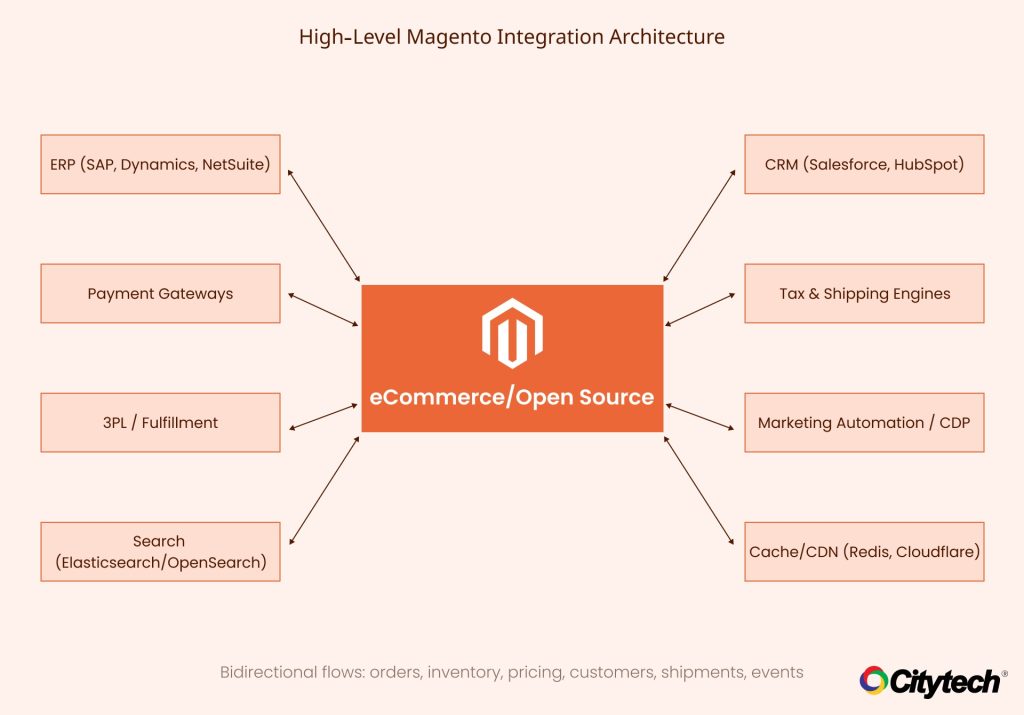
For many mid-market and enterprise businesses, the most technically demanding part of a Magento migration is reconnecting all the systems that sit around the store. ERP integration Magento is particularly complex because ERP systems (SAP, Oracle, Microsoft Dynamics, NetSuite, and others) are the source of truth for inventory, pricing, and order management.
A properly architected ERP integration with Magento involves bidirectional data flows: orders flowing from Magento to the ERP, and inventory/pricing updates flowing from the ERP back to Magento. Each of these flows needs to be designed, developed, and rigorously tested. Poorly implemented ERP integrations are one of the leading causes of post-launch operational problems.
Beyond ERPs, you may also need to integrate CRM systems (Salesforce, HubSpot, Microsoft Dynamics CRM), 3PL and fulfillment systems, marketing automation platforms, payment gateways, tax engines (Avalara, TaxJar), and shipping carriers. Each integration adds to both the build time and the testing burden.
5. Magento Theme Development and Frontend Design
The visual layer of your migration, Magento theme development, is another significant time variable. You have two broad approaches: use an existing Magento theme or theme framework (such as Hyvä, Porto, or Luma) as a starting point, or commission a fully custom Magento theme built from scratch.
A theme-based approach significantly reduces development time and cost. Starting from a proven, performance-optimized theme like Hyvä (which is built on modern Alpine.js and Tailwind CSS for exceptional Core Web Vitals performance) means the foundation is already solid and developers can focus on brand customization rather than front-end architecture.
A fully custom Magento theme, while offering maximum design flexibility, requires significantly more time, typically an additional four to six weeks compared to a theme-based approach. Some businesses use the migration as an opportunity for a complete design refresh; others prefer to replicate the look and feel of their current store and iterate on design post-launch.
6. Multi-Store Magento Setup Requirements
Magento natively supports running multiple stores from a single installation, different languages, currencies, product catalogs, and brand identities, all managed from one backend. If your business requires a multi-store Magento setup (for example, separate stores for different geographic markets, B2B vs B2C channels, or multiple brands), the configuration complexity increases substantially.
Multi-store environments require careful planning of the store hierarchy, shared vs. independent catalog configurations, and localization requirements including language, currency, and tax. Each additional store essentially multiplies certain elements of the testing scope.
7. B2B Magento Migration Complexity
B2B eCommerce stores present the most complex migration scenarios. Magento’s native B2B module (available in Adobe Commerce) includes features like company accounts, custom buyer roles and permissions, negotiable quotes, purchase orders, quick order entry, requisition lists, and shared catalogs. If your current B2B platform supports any of these capabilities, they need to be carefully mapped to Magento’s B2B architecture.
For B2B Magento migrations, the discovery phase often uncovers unique business rules, including custom quoting workflows, approval chains, account-specific pricing matrices, and order management processes, which need to be meticulously recreated. B2B migrations routinely extend beyond 20 weeks for this reason.

Magento Migration Timeline by Store Complexity: Realistic Ranges
With the factors above in mind, here are realistic timeline ranges based on store complexity. These ranges assume a competent, experienced Magento development team working with clear requirements and reasonable client response times.
| Store Type | Approx. Timeline | Typical Characteristics |
| Simple Store | 8 – 12 weeks | Smaller catalog (<2,000 SKUs), minimal customizations, 1-2 basic integrations (payment gateway, shipping), theme-based frontend, clean data |
| Mid-Complexity Store | 12 – 20 weeks | Medium catalog (2,000–30,000 SKUs), 3-5 integrations, several custom features to rebuild, some data cleanup needed, possible theme customization |
| High-Complexity / Enterprise Store | 20 – 36+ weeks | Large catalog (30,000+ SKUs), B2B workflows, ERP/CRM integrations, multi-store setup, custom quoting, significant data remediation, fully custom theme |
| Magento 1 to Magento 2 | 6 – 16 weeks | Effectively a full rebuild due to architectural differences; extensions need re-evaluation; theme must be rebuilt; data migration relatively structured via Magento Data Migration Tool |
A Magento migration done properly is not a fast project. But the cost of rushing like missed data, broken integrations, and poor performance far exceeds the cost of doing it right. The Magento migration timeline above reflects quality-first execution.
The Magento Migration Phases: A Step-by-Step Process Breakdown
Every well-run Magento migration, regardless of the source platform or store complexity, follows a defined set of phases. Understanding these Magento migration phases helps you plan resource allocation, manage internal stakeholders, and know what to expect at each stage.
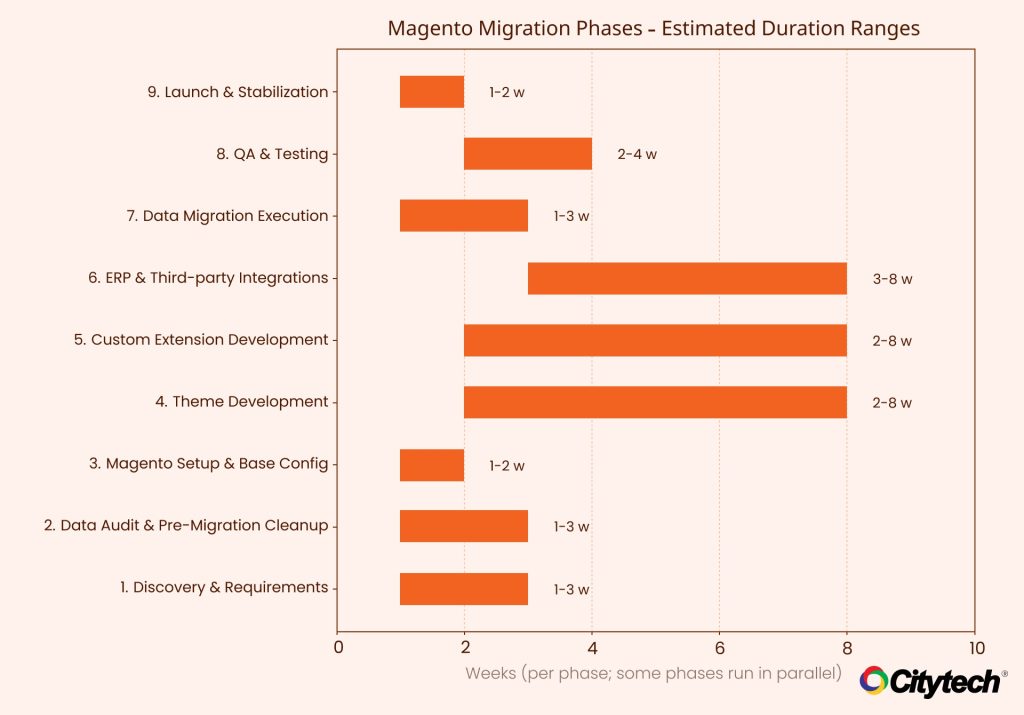
Phase 1: Discovery and Requirements Gathering (1–3 Weeks)
Discovery is arguably the most important phase of the entire migration. This is where the entire scope of the project is defined, risks are identified, and the migration strategy is documented. A thorough discovery phase prevents costly mid-project surprises.
During discovery, your Magento migration partner will audit your current platform’s data structure, map all custom functionality and extensions, evaluate all third-party integrations, analyze your product catalog for complexity and data quality issues, define the target Magento architecture (multi-store setup, store views, B2B configuration), and establish the project roadmap with milestones.
Skimping on discovery is one of the most common mistakes in eCommerce replatforming. Projects that begin without a comprehensive discovery phase almost invariably encounter scope creep, budget overruns, and timeline delays.
Phase 2: Data Audit and Pre-Migration Cleanup (1–3 Weeks)
Before any data migration Magento work begins, your existing data must be audited and, where necessary, cleaned. This phase involves identifying and resolving duplicate customer records, standardizing product attribute formats, removing orphaned records (products assigned to non-existent categories, orders with missing customer references), and validating URL structures and redirect mapping to protect SEO.
The effort required here is highly variable. A well-managed Shopify store migrating to Magento may have relatively clean data. A Magento 1 store that has been running for 10 years with multiple development teams may have accumulated years of inconsistencies that need remediation before migration tools can run reliably.
Phase 3: Magento Open Source Setup and Base Configuration (1–2 Weeks)
This phase covers the Magento Open Source setup: installing Magento on the server environment, configuring the web server stack (typically Nginx, PHP-FPM, MySQL, Redis, Elasticsearch/OpenSearch), setting up the development, staging, and production environments, and applying initial Magento configuration including store settings, tax and shipping zones, and payment gateway connections.
For technically demanding deployments, Citytech leverages a robust stack including Redis Cache for session and full-page cache, Elasticsearch/OpenSearch for catalog search, RabbitMQ for message queue management, and CDN integration via Cloudflare for performance and security. CI/CD pipelines using Jenkins and GitHub Actions ensure reliable, automated deployments throughout the build phase.
Phase 4: Magento Theme Development (2–8 Weeks)
Theme development runs in parallel with backend configuration. For a theme-based approach, this phase involves installing and configuring a base Magento theme (Hyvä, Luma, or a commercial theme), customizing the theme to match your brand guidelines, building out custom page layouts (homepage, category pages, product detail pages, checkout), and ensuring full responsiveness and mobile-first performance.
For a fully custom Magento theme, the frontend team designs and develops the theme from scratch, typically beginning with wireframes and UI/UX design mockups before entering the development phase. The Hyvä theme framework, which Citytech’s team is experienced with, significantly improves Core Web Vitals scores compared to traditional Luma-based themes.
Phase 5: Custom Extension Development and Custom Functionality Magento Build (2–8 Weeks)
This phase covers all the custom Magento extension development required to replicate business-specific functionality from your previous platform. This may include custom product configurators, loyalty and reward program integrations, advanced checkout logic, custom pricing rules, subscription order management, or any other functionality unique to your business model.
Magento’s modular architecture, built on the principles of service contracts and dependency injection, enables clean, maintainable custom extension development. Custom extensions developed according to Magento coding standards are testable, upgradeable, and maintainable without touching Magento core files.
Phase 6: ERP Integration Magento and Third-Party System Connections (3–8 Weeks)
ERP integration Magento work typically happens in parallel with theme and custom extension development. Each integration is its own sub-project: design the integration architecture (REST API, SOAP, message queue, or file-based), develop the connector, implement error handling and logging, and test end-to-end data flows.
Integration testing is particularly important and time-consuming. Unlike feature testing (where you check that a button does what it should), integration testing requires validating complex data flows across system boundaries, ensuring that an order placed in Magento correctly updates inventory in your ERP, triggers a fulfillment workflow in your 3PL, and sends the right data to your CRM.
Phase 7: Data Migration Magento Execution (1–3 Weeks)
With the destination Magento environment fully built and configured, data migration can be executed. For most migrations, this is done in multiple stages: first a test migration to validate that data maps correctly and no records are lost or corrupted, then adjustments based on test results, and finally the production migration timed to coincide with the store launch.
Critical data migration considerations include preserving all historical order data for customer service and accounting purposes, maintaining URL structures and implementing correct 301 redirects to protect SEO rankings, migrating customer passwords (which requires special handling since they cannot be exported in plaintext), and validating product data integrity post-migration.
Phase 8: Quality Assurance and Testing (2–4 Weeks)
Comprehensive QA testing is non-negotiable before any Magento store migration goes live. At Citytech, our QA process includes functional testing (every feature and workflow tested against requirements), integration testing (all connected systems validated), performance and load testing (using JMeter to simulate real-world traffic), accessibility testing (validating WCAG compliance), cross-browser and cross-device testing, and security testing.
User acceptance testing (UAT) by your team is also a critical component. Your internal stakeholders know your business processes best, and they often uncover edge cases and business-specific scenarios during UAT that the original requirements did not capture.
Phase 9: Launch and Post-Migration Stabilization (1–2 Weeks +)
A well-planned Magento migration launches with minimal drama. The actual cutover involves DNS propagation, final data sync from the old platform, cache warming, and a structured go-live checklist. Your Magento development team should be on standby for the first 48-72 hours post-launch to address any issues that arise.
Post-launch, a stabilization period of two to four weeks is standard. This covers monitoring server performance under real traffic, addressing any minor issues that surface, completing any remaining data reconciliation, and training your team on Magento administration.
Common Magento Migration Challenges and How to Avoid Them
Having handled Magento migrations across a wide range of business types and source platforms, Citytech’s team has seen every type of migration challenge. Here are the most common challenges and how to avoid them:
1. Inadequate Pre-Migration Data Audit
Moving data without properly auditing it first is the single most common cause of post-launch operational problems. Customer records with missing emails, products with broken image links, orders pointing to deleted customers, all of which will cause errors in your new Magento environment. Allocate proper time for a data audit before any migration work begins.
2. Underestimating Extension Replacement Complexity
Each app or extension from your previous platform represents a feature that needs to be evaluated and either replaced by native Magento functionality, replaced by a third-party Magento extension, or built as a custom Magento extension. Teams that underestimate this process often find themselves mid-build realizing that three or four critical features have no direct replacement and require custom development.
3. SEO Risk from URL Structure Changes
Every eCommerce replatforming project carries SEO risk. Product URLs, category URLs, and CMS page URLs that change without proper 301 redirects will result in broken links and lost search engine rankings. A comprehensive URL mapping exercise must be part of the data migration Magento planning process.
4. Compatibility Issues in Magento 1 to Magento 2 Migration
Merchants migrating from Magento 1 to Magento 2 face a particular challenge: the two platforms have fundamentally different codebases. Extensions built for Magento 1 are not compatible with Magento 2. Themes built for Magento 1 cannot be used in Magento 2. Custom code developed for Magento 1 must be rewritten from scratch to Magento 2 standards. This is why a Magento 1 to Magento 2 migration is effectively a rebuild, not an upgrade.
5. Rushing the Go-Live Timeline
The temptation to launch ahead of schedule is real. But launching with inadequate testing creates a different kind of urgency. Fixing customer-impacting bugs on a live production store, often under time pressure, makes careful fixes difficult.
When Should You Start Planning Your Magento Migration?
There are several business triggers that should prompt you to begin evaluating a Magento migration:
- Your current platform is consistently hitting performance or scalability limits during peak traffic.
- You are investing a significant development budget in your current platform to work around its limitations.
- You are planning a major front-end or functionality overhaul that would need to be repeated post-migration anyway.
- Your B2B capabilities are insufficient and require expensive workarounds.
- Your ERP or other enterprise systems are difficult or expensive to integrate with your current platform.
- You are running Magento 1 and have not yet migrated (Magento 1 reached end of life in June 2020).
- You are approaching a peak season (peak season is not the time to launch a migration). Plan to complete your migration at least 6–8 weeks before your busiest period.
One strategic insight worth highlighting: if you are planning significant investment in your current platform (a frontend redesign, new integrations, custom features), it often makes financial sense to migrate first and apply those investments to the new Magento platform, rather than paying for work twice. Verify this with your development partner by getting migration cost estimates and comparing them against your planned investment on the current platform.
Magento Migration Cost: What Influences Pricing
Magento migration cost is directly proportional to complexity. The factors that extend your timeline also extend your cost. Here is a framework for thinking about what drives migration investment:
Factors that increase Magento migration cost
- Large, complex product catalogs requiring substantial data transformation work
- Multiple ERP, CRM, or 3PL integrations requiring custom connector development
- Significant custom functionality that needs to be rebuilt as Magento extensions
- Fully custom Magento theme development rather than theme-based customization
- Multi-store Magento setup with multiple languages and currencies
- B2B Magento migration with complex account structures and pricing rules
- Poor source data quality requiring extensive cleanup before migration
- Tight launch timelines requiring larger parallel development teams
Factors that reduce Magento migration cost
- Clean, well-structured source data
- Limited customizations on the current platform
- Willingness to adopt native Magento functionality rather than replicating everything
- Using a proven Magento theme framework like Hyvä rather than a custom theme
- Standard payment gateway and shipping integrations
- Clear, detailed requirements provided upfront
Citytech offers flexible engagement models for Magento migration projects, hourly, monthly retainer, or fixed-price project-based, to suit different business needs and budget structures. Our experienced team of 10+ full-time Magento developers ensures efficient delivery without compromising on quality.
Choosing the Right Magento Migration Partner
The partner you choose for your Magento migration will have more impact on the outcome than almost any other variable. A technically strong, experienced Magento development team can turn a complex migration into a structured, predictable project. An inexperienced team can turn a straightforward migration into a costly, extended ordeal.
What to look for in a Magento migration partner
- Demonstrated experience with Magento migrations specifically, not just Magento development in general
- A structured discovery and scoping process that produces detailed technical specifications
- Technical depth in data migration, including experience with complex data transformations
- Proven experience with ERP integration Magento projects at a similar scale to yours
- A QA process that includes load testing and performance validation, not just functional testing
- Clear communication processes and project management tools (Jira, Trello, etc.)
- Post-launch support and maintenance capabilities
- References from completed migrations of similar complexity
Citytech has been delivering Magento development and migration services for over a decade, with a team of dedicated Magento developers. Our portfolio includes complex B2B migrations, multi-store Adobe Commerce implementations, and ERP integration projects for businesses across 40 countries. We offer full technical transparency through all phases of the project, with regular milestone updates and access to our project management tooling.
How Citytech Approaches Magento Migration Projects
At Citytech, Magento migration is a core competency developed over 17+ years of eCommerce development. The technical approach combines deep Magento expertise with enterprise-grade engineering practices to deliver migrations that are not just functional on day one, but built to scale and perform over the long term.
Our technical stack for Magento deployments includes
- Redis Cache for session management and full-page cache (dramatically improves Magento performance)
- Elasticsearch / OpenSearch for fast, scalable catalog search
- RabbitMQ for message queue processing (essential for high-volume order and integration workflows)
- New Relic for real-time performance monitoring and application profiling
- CDN integration via Cloudflare for global content delivery and WAF security
- CI/CD pipelines via Jenkins and GitHub Actions for reliable, automated deployments
- JMeter for load and performance testing under simulated real-world traffic
- Selenium-based automation testing for regression testing across releases
- MySQL optimization using MySQL Tuner for database performance tuning
Our Magento migration services are GDPR-compliant and include enterprise-class security practices throughout the migration process. We work with businesses in the USA, UK, Australia, UAE, and globally, with a proven track record in Food & Beverage, Retail, Wholesale/B2B, Electrical, and other verticals.
Bottomline
The Magento migration is not something you can pull from a template. You need to calibrate it to the specific realities of your current platform, your data, your integrations, and your business requirements. But that does not mean it is unpredictable. With the right discovery process and an experienced team, you can plan your eCommerce replatforming with confidence and clarity.

Frequently Asked Questions
Magento migration complexity increases with custom functionality, ERP integration, B2B workflows, multi-store setup, and large product catalogs.
Product data migration can take 3–6 weeks depending on SKU volume, attribute mapping requirements, and data quality.
Yes, however, we can minimize the SEO impact with proper redirect mapping, metadata transfer, and URL preservation.
Discovery, infrastructure setup, theme development, data migration, custom development, integration testing, QA, and deployment.
Magento Open Source offers greater customization, scalability, and integration flexibility compared to SaaS platforms.
Cost depends on complexity, integrations, and custom development requirements. Enterprise migrations typically require larger budgets.
ERP integrations typically take 4–10 weeks depending on API stability and data synchronization logic.
Yes, Magento natively supports multi-store architecture with separate catalogs, currencies, and themes.